Use your phone to rent a CycleDios bicycle. No CycleDios Campus app download or credit top-up required.
1. Scan the bike QR code. Use your phone camera to open the rental page in your browser.
2. Pay with Touch ’n Go eWallet. Check the bicycle number and rental charges, then select Touch ’n Go eWallet at checkout.
3. Unlock and ride. Follow the on-screen instructions after payment is confirmed. Check that the lock has fully opened before you ride.
4. Park, lock and end your ride. Return to a designated CycleDios parking area, secure the lock and check that your rental page confirms your ride has ended.
Rear-Wheel Electronic Lock Tutorials
Rear-Wheel Electronic Lock Illustrated Guide
This English and Bahasa Melayu illustration explains how to check the locking pin, unlock the bicycle and end your ride. For Campus rides, follow the payment options, parking rules and any applicable fees shown on your Campus rental page.
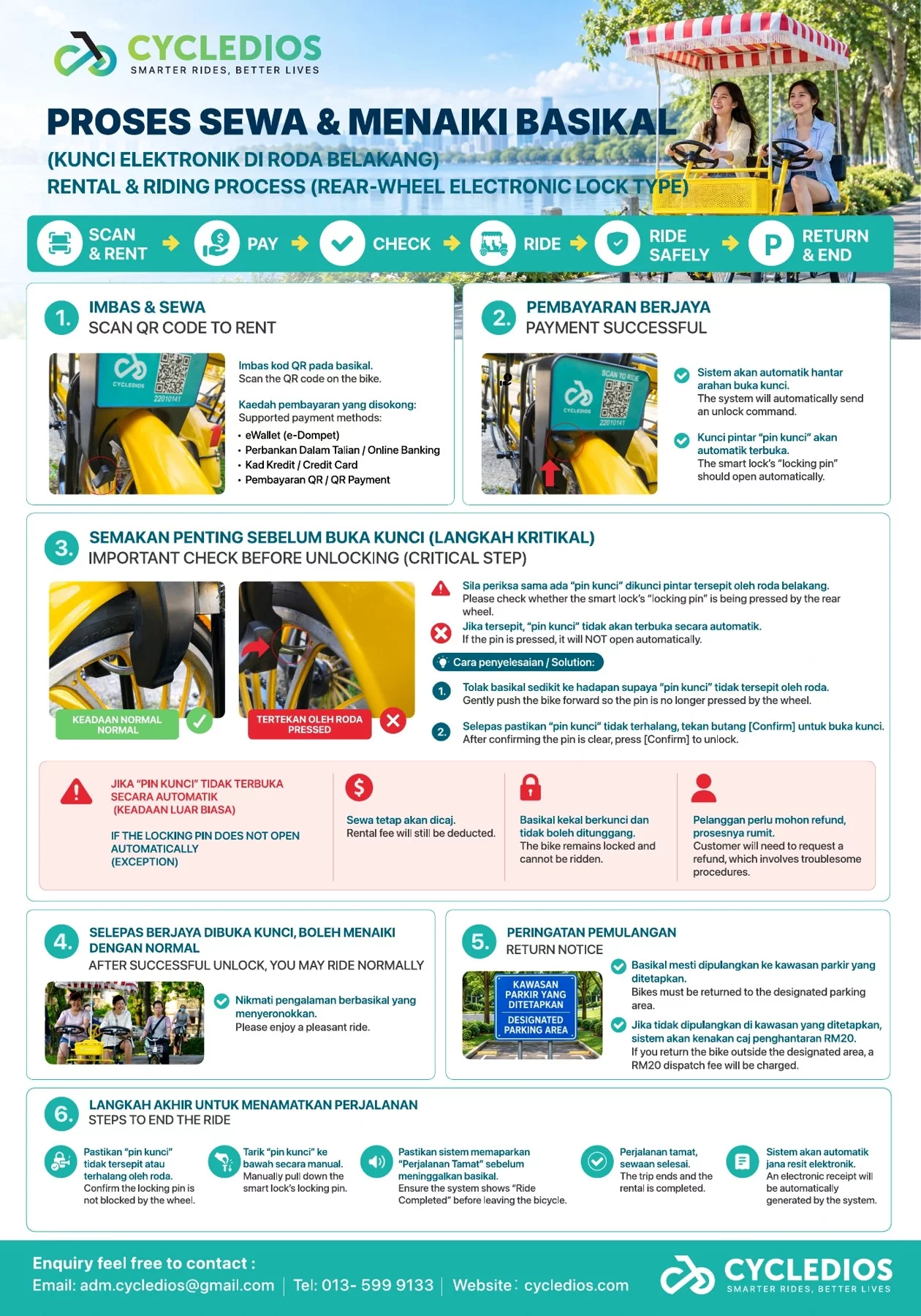 View full-size illustrated guide
Paid but the bicycle is still locked? Check your existing rental before paying again. Contact CycleDios Support with your bicycle number, station and payment reference.